Hyper Menu
The Hyper Menu is the main in-game menu: voting, store, warps, claims, economy shortcuts, and more in one place. Open it with /m only. The title shows your name.
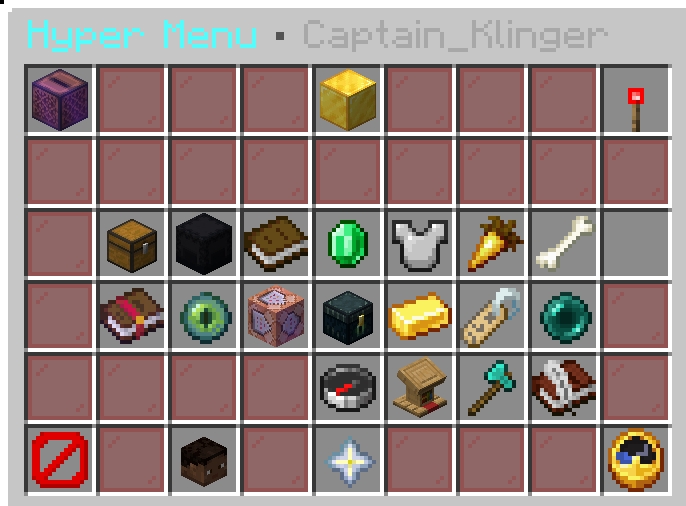
/m)For command-style reference (store, Discord, orders, and more), see Commands.
Menu Options
Names match the buttons in the menu. Left-click is the default unless noted.
| Section | Button | What it does | Opens / runs |
|---|---|---|---|
| Top bar | VOTE DAILY • MORE REWARDS | Vote for the server; earn keys, gems, coins, XP, and similar rewards (each site resets on its own timer). | /vote. Shift-click: paste all vote links /voteall. |
| Top bar | ONLINE STORE • /buy | Open the web store for ranks, keys, cosmetics, and perks; purchases apply in-game after checkout. | /buy · store.hyperblockssmp.com |
| Top bar | TOGGLE SCOREBOARD | Show or hide the sidebar scoreboard. | /sb toggle |
| Main grid | AUCTION HOUSE | Browse and manage player listings. | /ah |
| Main grid | CRATE YARD • WARP | Teleport to the crate area. | /warp Crate_Yard |
| Main grid | HELP MENU | Open the full help screen (commands, ranks, rules, economy, crates, and related topics). | Opens the help GUI |
| Main grid | HYPER SHOP | Open the in-game shop. | /shop |
| Main grid | KITS | Claim kits available to your rank. | /kits |
| Main grid | NIGHT VISION • TOGGLE | Toggle night vision on or off. | /nv (left or right click) |
| Main grid | PETS • ABILITIES | Browse, summon, and manage pets. | /pets |
| Main grid | Premium Options | Quick utilities: crafting table, loom, and cartography table in one submenu. | Opens premium submenu |
| Main grid | RANDOM TELEPORT | Teleport to a random safe location. | /rtp |
| Main grid | ✦ Referral Manager ✦ | Set your referrer (once), track milestones, and claim rewards. Shift-click puts a shareable link in chat. | /referral · shift: /referral web |
| Main grid | REWARDS | Claim available rewards and perks. | /rewards |
| Main grid | SELL • GUI / HAND | Choose what to sell, or use shift-clicks for faster selling. | Left: /sellgui. Shift-left: sell held item. Shift-right: /sellall. |
| Main grid | TAG • CHAT/TAB | Pick what appears next to your name in chat/tab. | /tags · /mytags |
| Main grid | WARPS • QUICK TRAVEL | Open the warp list and travel. | /warps |
| Tools row | Claims & land menu | Land claim hub: withdraw blocks, transfer, your claims list, MLS entry, and related actions. | /claimprotect or /clp with no args (see Land claims) |
| Tools row | MLS Marketplace | Browse and list claims for sale on the marketplace. | /mls · MLS |
| Tools row | LAST DEATH • TELEPORT | Return to your most recent death location. | Opens the last-death menu — same as /dback. If unsure, use /help or the Commands wiki page. |
| Tools row | HYPER ORDERS • MARKET | Player orders: create listings, deliver, and collect payouts from the GUI. | /orders |
| Tools row | SELL AXE • BULK CHEST SELL | Receive a Sell Axe; right-click chests to sell eligible contents at shop prices. | Grants the tool to your inventory |
| Tools row | Quest board & shop | Quest board and quest shop. | /qb · shift-click: /questshop |
| Bottom bar | CLOSE | Close the menu. | — |
| Bottom bar | PLAYER WARPS (GUI) | Create and visit player warps. | /pw (aliases on Commands → Warps, Trading, and Auction) |
| Bottom bar | MAIN LOBBY | Leave Survival and return to the main lobby. | Network connect: lobby |
| Bottom bar | RESTORE MENU CLOCK | If you lost the clock item that opens this menu, click here to get it again. | Restores the menu clock to your inventory |
Server owners may see a different action in the bottom-right corner (menu reload). Everyone else sees Restore menu clock there.