
General commands
Store, Discord, orders, and server menus (including the Hyper Menu and help).
Hyper Menu
The Hyper Menu is the main menu for the server where all options are located. Open it with /m or /sm. The menu title shows your name. Use the shortcuts below to reach voting, store, warps, kits, pets, and more.
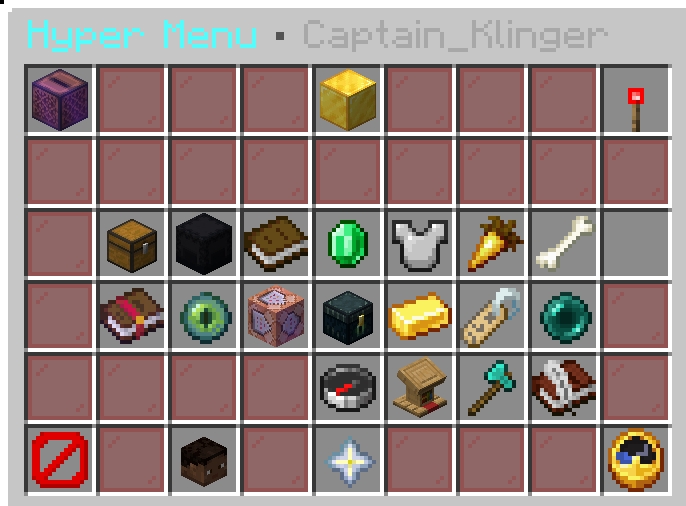
/m or /sm) — main server menu| Shortcut | Description |
|---|---|
| VOTE DAILY • MORE REWARDS | Opens vote menu (/vote). Shift-click: show all vote links (/voteall). |
| ONLINE STORE • /buy | Opens web store (HyperShop.vip). Runs /buy. |
| TOGGLE SCOREBOARD | Show/hide sidebar scoreboard. Runs /sb toggle. |
| AUCTION HOUSE | Browse/list trades. Runs /ah. |
| CRATE YARD • WARP | Teleport to Crate Yard. Runs /warp Crate_Yard. |
| HELP MENU | Opens full Help GUI (commands, ranks, rules, economy, crates, etc.). |
| HYPER SHOP | Opens in-game shop. Runs /shop. |
| KITS | Opens kits menu for rank kits. Runs /kits. |
| NIGHT VISION • TOGGLE | Toggle night vision. Runs /nv. |
| PETS • ABILITIES | Browse/summon/manage pets. Runs /advancedpets. |
| Premium Options | Opens Premium Menu (crafting table, loom, cartography table). |
| RANDOM TELEPORT | Random safe teleport. Runs /rtp. |
| ✦ Referral Manager ✦ | Track referrals, milestones, rewards. Runs /referral; shift-click: /rf web. |
| REWARDS | Claim rewards and perks. Runs /rewards. |
| SELL • GUI / HAND | Left: /sellgui. Shift-left: sell hand; shift-right: /sellall. |
| TAG • CHAT/TAB | Choose tag next to name. Runs /tag. |
| WARPS • QUICK TRAVEL | Browse and use warps. Runs /warps. |
| LAST DEATH • TELEPORT | Teleport to last death location. Runs /cmi dback. |
| HYPER ORDERS • MARKET | Orders marketplace GUI. Runs /orders (create/deliver/collect). |
| SELL AXE • BULK CHEST SELL | Get Sell Axe; right-click containers to sell. |
| HyperQuests | Quest board (/qb); shift: quest shop (/questshop). |
| PLAYER WARPS (GUI) | Player warps menu. Runs /axpw (create: /axpw create, visit: /axpw warp). |
| MAIN LOBBY | Send to Main Lobby (BungeeCord connect: lobby). |
| CLOSE | Closes the menu. |
Other commands
For store, Discord, orders, and server menu commands, see General commands – Commands.